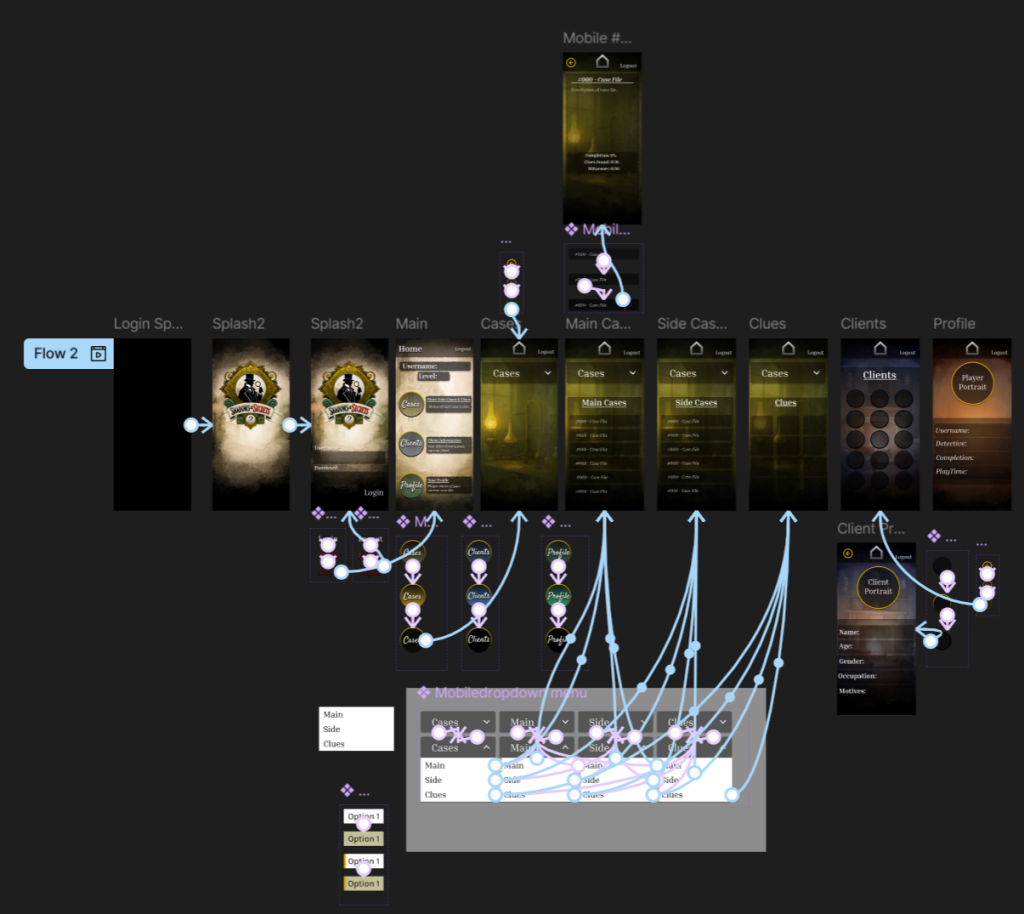
In this phase, I developed the user flow and wireframed the UI for Shadows and Secrets, the companion app to the main detective game. I used Figma to map out the whole app and create wireframes, focusing on functionality while reflecting the game’s Victorian and detective themes, and referenced my FigJam board when creating the wireframe, referring to my final concept.
The main features of the companion app are a login screen, followed by a main menu with three main navigation options: the Cases menu, Client menu, and Profile menu. Each section was designed with the player’s investigative journey in mind – I didn’t want to overcomplicate the design wireframe, and kept it simple like a book/journal.
In the Cases menu, I created dropdown buttons to access Main Cases, Side Cases, and a third option that leads to the Clues menu. A technical limitation I hit during this was that I couldn’t assign the same “on-click” interaction to the dropdown buttons on the free FigJam plan. To get around this, I used the “when mouse is pressed down” interaction instead, which allowed me to simulate the dropdown behaviour.
The Client menu has multiple character buttons. When players select one, they are taken to a dedicated page with more information about that client, like reviewing a witness dossier. The Profile menu shows the player’s username, their chosen detective (male or female), the story completion percentage, and the overall playtime, a clean and personal overview of their progress.
A consistent visual goal throughout the app is to make it feel like turning the pages of an old journal or casebook. This supports the game’s tone and helps with immersion through simple transitions. Also, I plan to make the visual appearance more personal, using my artwork for backgrounds and hover animations, as well as add page-turning audio.
Hi, this is a comment.
To get started with moderating, editing, and deleting comments, please visit the Comments screen in the dashboard.
Commenter avatars come from Gravatar.